
Overview
Kleidos on the M5Stack Core2 v1.3
Kleidos turns the M5Stack Core2 v1.3 into a password manager: it keeps your passwords encrypted on the board and types them into your computer or phone over Bluetooth, after you unlock it on the board itself. The firmware costs nothing and asks for no account. There is nothing to install yet: version 0.1.0 is not released.
The same firmware runs on nine boards, and I recommend none of them over the others: this page says what the Core2 does with it.
Updated
Kleidos on its own screen
Apart from its unlock, which plays on its case on the home page, I have not recorded the Core2. These are three frames I took straight off its own screen, with a demonstration vault on a development build: the PIN screen, the vault list and an entry.
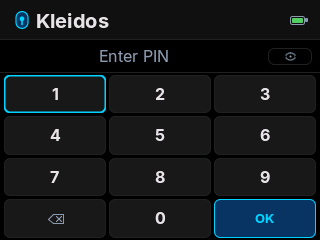
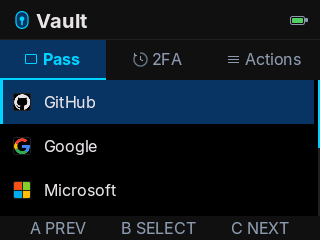
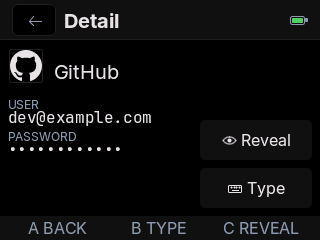
Each picture's badge says how I made it, and the legend of the badges explains every kind.
- Device screen
What each control does
Each row quotes what the Core2 itself shows for that control: on the pages it shows the first time it starts, or in the bar at the foot of its vault list.
| Control | What the board says it does |
|---|---|
| A tap | “select” |
| A swipe up or down | “scroll” |
| A swipe sideways | “change tab” |
| The A mark below the screen | “PREV” |
| The B mark below the screen | “SELECT” |
| The C mark below the screen | “NEXT” |
| A tap on a row, then another | “Tap a row, tap it again to open” |
| The power button | “Press power to lock” |
- A tap
- What the board says it does: “select”
- A swipe up or down
- What the board says it does: “scroll”
- A swipe sideways
- What the board says it does: “change tab”
- The A mark below the screen
- What the board says it does: “PREV”
- The B mark below the screen
- What the board says it does: “SELECT”
- The C mark below the screen
- What the board says it does: “NEXT”
- A tap on a row, then another
- What the board says it does: “Tap a row, tap it again to open”
- The power button
- What the board says it does: “Press power to lock”
I will write a guide to every screen, board by board, once the interface stops changing.
The board: what it holds and how it keeps time
The vault is the same on every board. What changes with the board is how much it holds, how it keeps time for the one-time codes and where its backups go.
- Chip
- ESP32
- Input
- Touch screen
- Screen
- 320×240
- Case
- 54×54 mm
- Capacity
- 500 credentials, 50 two-factor (2FA) codes
- Clock
- Battery-backed chip
- 2FA codes
- On as it comes
- Card slot
- Yes: it writes its own backups
What else is particular to the Core2
- It shows the same screens as the CoreS3 SE, so the CoreS3 SE's recordings stand for it on the recordings page.
- It has a motion sensor, so its settings offer “Shake to lock” and the shake's sensitivity.
- On the classic ESP32 two Bluetooth protections cannot be on together: the controller refuses its accept list while the rotating private address is on. The Core2 keeps the private address and, in the list's place, drops anything that is not paired as it connects.
- Its hardened build needs a classic ESP32 of chip revision 3.0 or later.
What it draws from its battery
What the Core2 draws in each state, as the measurements page prints it. That page says what each state is and how each figure was taken.
-
These figures are readings from its own power controller, which I have not checked against the measurement system. They were taken on a development build with a prototype that lets the idle chip drop to a slower clock and that the shipped firmware does not have. Without figures from the measurement system, I give no battery estimate for it. I publish no unlock time for it yet.
- Asleep
- not yet
- Light sleep
- not on this board
- Normal use
- 70.4 mA
- own sensor
- Wi-Fi
- 153.4 mA
- own sensor
- Bluetooth
- 91.9 mA
- own sensor
Switches off at its power controller, which stays awake to switch it back on, and draws while it waits.
What it costs
Kleidos costs nothing: there is nothing to buy from the project and no account to make, and the firmware is free software under GPL-3.0-or-later. What you pay for is the board.
- Price
- US$42.90
- Listed by
- M5Stack's own store
- Product code
- K010-V13
- Read on
- 1 November 2026
That is what the maker's own store asked on the day I read it, before shipping and taxes. Resellers set their own prices, and prices change.
Where the firmware stands
Kleidos is pre-release, at version 0.1.0: there is nothing to install yet, and the roadmap says what is left before the first release.
- Version
- 0.1.0
- To install
- Nothing yet: no release is published
- Hardened build
- Yes, on chip revision 3.0 or later
I have not had the firmware or the cryptography reviewed by anybody outside the project; the security page says what you can and cannot check.