











M5StickS3
M5StickC Plus2
M5StickC Plus 1.1
M5StickC Plus SE
M5Stack CoreInk
M5Stack CoreS3 SE
M5Stack Core2 v1.3
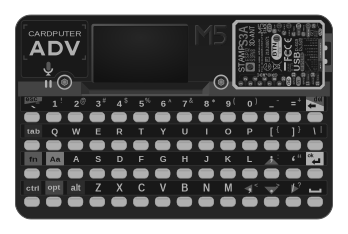
M5Cardputer ADV
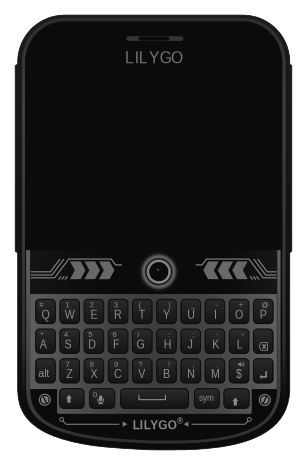
LILYGO T-Deck Plus
The same step, on another board
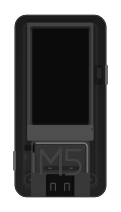
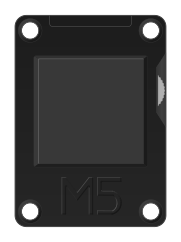
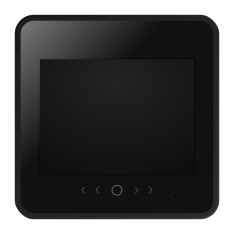
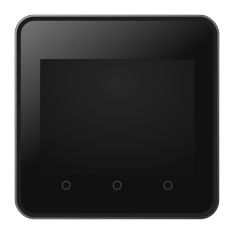
1. Unlock
You unlock it on the board.
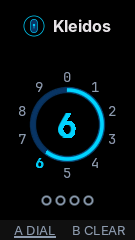
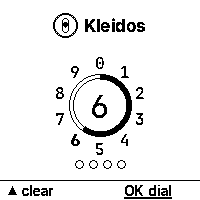
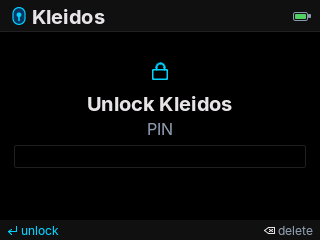
The M5StickS3 has two buttons and no keypad. You hold button A while the dial on its screen fills from 0 to 9 and let go on your digit, one hold per digit. When the last one is set, the PIN is checked with no further press.
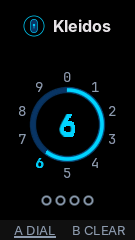
The M5StickC Plus2 has two buttons and no keypad. You hold button A while the dial on its screen fills from 0 to 9 and let go on your digit, one hold per digit. When the last one is set, the PIN is checked with no further press.
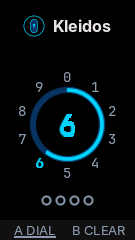
The M5StickC Plus 1.1 has two buttons and no keypad. You hold button A while the dial on its screen fills from 0 to 9 and let go on your digit, one hold per digit. When the last one is set, the PIN is checked with no further press.
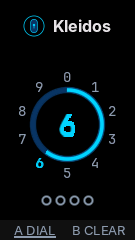
The M5StickC Plus SE has two buttons and no keypad. You hold button A while the dial on its screen fills from 0 to 9 and let go on your digit, one hold per digit. When the last one is set, the PIN is checked with no further press.
The M5Stack CoreInk has a wheel and no keypad. You hold the wheel's middle key (OK) while the dial on its screen fills from 0 to 9 and let go on your digit, one hold per digit. When the last one is set, the PIN is checked with no further press.
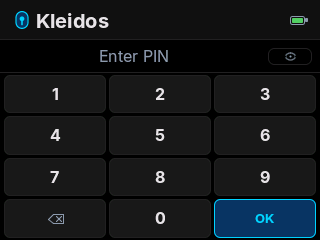
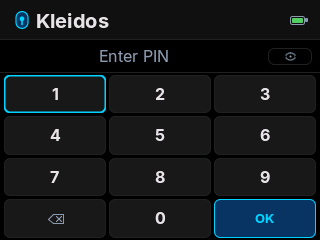
On the M5Stack CoreS3 SE you tap your PIN on its own touch screen or, if you chose a passphrase instead, type it on the keyboard the screen draws. You type nothing on your computer or phone.
On the M5Stack Core2 v1.3 you tap your PIN on its own touch screen or, if you chose a passphrase instead, type it on the keyboard the screen draws. You type nothing on your computer or phone.
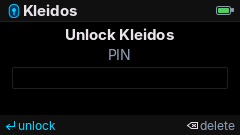
The M5Cardputer ADV has a keyboard of its own, so it takes a passphrase instead of a PIN. You type it on the board's own keys, and nothing on your computer or phone.
The LILYGO T-Deck Plus has a keyboard of its own, so it takes a passphrase instead of a PIN. You type it on the board's own keys, and nothing on your computer or phone.
- Key derived with PBKDF2-SHA256: 175,000 iterations on its ESP32-S3 Key derived with PBKDF2-SHA256: 40,000 iterations on its ESP32 Key derived with PBKDF2-SHA256: 40,000 iterations on its ESP32 Key derived with PBKDF2-SHA256: 40,000 iterations on its ESP32 Key derived with PBKDF2-SHA256: 40,000 iterations on its ESP32 Key derived with PBKDF2-SHA256: 175,000 iterations on its ESP32-S3 Key derived with PBKDF2-SHA256: 40,000 iterations on its ESP32 Key derived with PBKDF2-SHA256: 175,000 iterations on its ESP32-S3 Key derived with PBKDF2-SHA256: 175,000 iterations on its ESP32-S3
- The PIN or passphrase is never stored
Modeled case, captured glass Modeled case, recorded glass Modeled case, captured glass Modeled case, recorded glass Modeled case, captured glass Modeled case, recorded glass Modeled case, captured glass Modeled case, recorded glass Modeled case, captured glass Modeled case, recorded glass Modeled case, captured glass Modeled case, recorded glass Modeled case, captured glass Modeled case, recorded glass Modeled case, captured glass Modeled case, recorded glass Modeled case, captured glass Modeled case, recorded glass
Screen captured on a real StickS3. A real StickS3 unlocking, recorded from its own screen. Screen captured on a real Plus2. A real Plus2 unlocking, recorded from its own screen. Screen captured on a real Plus 1.1. A real Plus 1.1 unlocking, recorded from its own screen. Screen captured on a real Plus SE. A real Plus SE unlocking, recorded from its own screen. Screen captured on a real CoreInk. A real CoreInk unlocking, recorded from its own screen. Screen captured on a real CoreS3 SE. A real CoreS3 SE unlocking, recorded from its own screen. Screen captured on a real Core2. A real Core2 unlocking, recorded from its own screen. Screen captured on a real Cardputer. A real Cardputer unlocking, recorded from its own screen. Screen captured on a real T-Deck. A real T-Deck unlocking, recorded from its own screen.
2. Vault
Your vault, on the board's own screen.
The M5StickS3 holds up to 250 entries and 40 two-factor (2FA) codes. An entry opens as a card: the service, the username, and the password, masked until you ask to see it.
The M5StickC Plus2 holds up to 90 entries and 40 two-factor (2FA) codes. An entry opens as a card: the service, the username, and the password, masked until you ask to see it.
The M5StickC Plus 1.1 holds up to 90 entries and 30 two-factor (2FA) codes. An entry opens as a card: the service, the username, and the password, masked until you ask to see it.
The M5StickC Plus SE holds up to 90 entries and 30 two-factor (2FA) codes. An entry opens as a card: the service, the username, and the password, masked until you ask to see it.
The M5Stack CoreInk holds up to 90 entries and 30 two-factor (2FA) codes. An entry opens as a card: the service, the username, and the password, masked until you ask to see it.
The M5Stack CoreS3 SE holds up to 500 entries and 50 two-factor (2FA) codes. An entry opens as a card: the service, the username, and the password, masked until you ask to see it.
The M5Stack Core2 v1.3 holds up to 500 entries and 50 two-factor (2FA) codes. An entry opens as a card: the service, the username, and the password, masked until you ask to see it.
The M5Cardputer ADV holds up to 250 entries and 40 two-factor (2FA) codes. An entry opens as a card: the service, the username, and the password, masked until you ask to see it.
The LILYGO T-Deck Plus holds up to 500 entries and 50 two-factor (2FA) codes. An entry opens as a card: the service, the username, and the password, masked until you ask to see it.
- Encrypted with AES-256 and authenticated with HMAC-SHA256, checked before anything is decrypted
- It has no clock chip, so 2FA codes are off as it comes; turned on, they need the time set from the network or your browser since the board last went to sleep It has a clock chip, so 2FA codes are on as it comes It has a clock chip, so 2FA codes are on as it comes It has a clock chip, so 2FA codes are on as it comes It has a clock chip, so 2FA codes are on as it comes It has a clock chip, so 2FA codes are on as it comes It has a clock chip, so 2FA codes are on as it comes It has no clock chip, so 2FA codes are off as it comes; turned on, they need the time set from the network or your browser since the board last went to sleep It has no clock chip, so 2FA codes are off as it comes; turned on, they need the time set from the network or your browser since the board last went to sleep
Modeled case, captured glass Modeled case, captured glass Modeled case, captured glass Modeled case, captured glass Modeled case, captured glass Modeled case, captured glass Modeled case, captured glass Modeled case, captured glass Modeled case, captured glass
Screen captured on a real StickS3. Screen captured on a real Plus2. Screen captured on a real Plus 1.1. Screen captured on a real Plus SE. Screen captured on a real CoreInk. Screen captured on a real CoreS3 SE. Screen captured on a real Core2. Screen captured on a real Cardputer. Screen captured on a real T-Deck.
3. Send
It asks, then it types.
Opening an entry sends nothing: the board first asks you what to type. Only once you have chosen does Bluetooth come up: the board connects as a keyboard and types it, one keystroke at a time. Your computer or phone receives keystrokes, the same ones any keyboard sends, and never the vault.
Modeled case, captured glass Modeled case, captured glass Modeled case, captured glass Modeled case, captured glass Modeled case, captured glass Modeled case, captured glass Modeled case, captured glass Modeled case, captured glass Modeled case, captured glass
Screen captured on a real StickS3. Screen captured on a real Plus2. Screen captured on a real Plus 1.1. Screen captured on a real Plus SE. Screen captured on a real CoreInk. Screen captured on a real CoreS3 SE. Screen captured on a real Core2. Screen captured on a real Cardputer. Screen captured on a real T-Deck.
4. Lock
Then it locks. Radios off.
As it comes, the board locks itself and goes to sleep once a send has gone through. A press while its screen is dark only wakes it: nothing else happens until the next press.
As it comes, the board locks itself and switches off once a send has gone through. Its power key turns it back on, at the unlock screen.
As it comes, the board locks itself and switches off once a send has gone through. Its power key turns it back on, at the unlock screen.
As it comes, the board locks itself and switches off once a send has gone through. Its power key turns it back on, at the unlock screen.
As it comes, the board locks itself and switches off once a send has gone through. Its power key turns it back on, at the unlock screen.
As it comes, the board locks itself and switches off once a send has gone through. Its power key turns it back on, at the unlock screen.
As it comes, the board locks itself and switches off once a send has gone through. Its power key turns it back on, at the unlock screen.
As it comes, the board locks itself and goes to sleep once a send has gone through. A press while its screen is dark only wakes it: nothing else happens until the next press.
As it comes, the board locks itself and goes to sleep once a send has gone through. Only its reset button or its power switch wakes it, at the unlock screen and with its clock unset.
- Bluetooth off
- Wi-Fi off
- The key wiped from memory
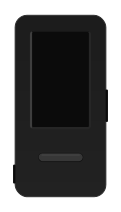
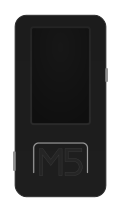
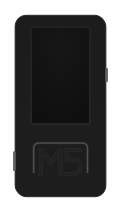
Modeled case, screen off Modeled case, screen off Modeled case, screen off Modeled case, screen off Modeled case Modeled case, screen off Modeled case, screen off Modeled case, screen off Modeled case, screen off
I have no capture of the image the CoreInk's e-paper screen keeps once the board locks, so its case is shown with no screen.

5. Yours
And it is still your board.
Kleidos solders nothing and adds no part. It is firmware: it goes in through the StickS3's own USB port and turns it into a password manager, whether you already own the board or buy one for this.
Kleidos solders nothing and adds no part. It is firmware: it goes in through the Plus2's own USB port and turns it into a password manager, whether you already own the board or buy one for this.
Kleidos solders nothing and adds no part. It is firmware: it goes in through the Plus 1.1's own USB port and turns it into a password manager, whether you already own the board or buy one for this.
Kleidos solders nothing and adds no part. It is firmware: it goes in through the Plus SE's own USB port and turns it into a password manager, whether you already own the board or buy one for this.
Kleidos solders nothing and adds no part. It is firmware: it goes in through the CoreInk's own USB port and turns it into a password manager, whether you already own the board or buy one for this.
Kleidos solders nothing and adds no part. It is firmware: it goes in through the CoreS3 SE's own USB port and turns it into a password manager, whether you already own the board or buy one for this.
Kleidos solders nothing and adds no part. It is firmware: it goes in through the Core2's own USB port and turns it into a password manager, whether you already own the board or buy one for this.
Kleidos solders nothing and adds no part. It is firmware: it goes in through the Cardputer's own USB port and turns it into a password manager, whether you already own the board or buy one for this.
Kleidos solders nothing and adds no part. It is firmware: it goes in through the T-Deck's own USB port and turns it into a password manager, whether you already own the board or buy one for this.
- The case, the controls and the port stay as the maker made them
- The open build leaves the board re-flashable: any other firmware can go over it
Everything about the M5StickS3Everything about the M5StickC Plus2Everything about the M5StickC Plus 1.1Everything about the M5StickC Plus SEEverything about the M5Stack CoreInkEverything about the M5Stack CoreS3 SEEverything about the M5Stack Core2 v1.3Everything about the M5Cardputer ADVEverything about the LILYGO T-Deck Plus
Modeled case Modeled case Modeled case Modeled case Modeled case Modeled case Modeled case Modeled case Modeled case
I have no capture of the image the CoreInk's e-paper screen keeps once the board locks, so its case is shown with no screen.

Each picture's badge says how I made it, and the legend of the badges explains every kind.
- Device screen


